Partner guide · Updated October 2026
How to Add Your Business to Tourist.com
First, what Tourist.com actually does for a business
Think of it from the traveler's side for a second. Someone lands in your city, opens the Tourist app (or tourist.com, same thing), and gets a free digital Tourist Card, which sounds like nothing until you realise that card is the key to every discount and little perk local places have put up for members. So they wander through the map or the catalog, something catches their eye, in they come, card out at the counter. You knock 10% off, or hand over a free espresso, or whatever it was you promised. Nobody books anything through us, there isn't a coupon code to type anywhere, and we are not standing in the middle taking a slice of it.
What you get out of it is a profile page, free, with your photos, a bit of text, your contacts, a pin on the map and your offers. We put that page in front of people who are physically in your city right now, or who are sitting at home planning a trip there. At the moment that's 55,242+ places across 195+ countries, and a fresh listing shows up in the catalog, on the map and in search, on the website and in the app, without you doing anything extra.
Who this is for
Pretty much anyone a traveler might hand money to. The obvious ones are restaurants, cafés and bars, but we've got hotels and B&Bs, apartment rentals, tour companies large and tiny, museums, a surprising number of massage places and surf schools, shops that sell ceramics or sunglasses, scooter rental, kids' attractions, eSIM sellers, independent guides with a van. Not sure which category is yours? Grab the nearest one, keep moving, swap it later if you must, it's two clicks.
What to have ready before you open the form
I'll be blunt: people who gather this stuff first finish in ten minutes, and people who don't come back three days later asking why their listing looks empty. The first group below is what we physically need to publish you. The second group is optional on paper, but it's the difference between a page that gets looked at and one that sits there.
We need these
- The name of the business, spelled the way your regulars actually say it, within 30 characters
- A category (Restaurants, say, or Tours & Activities, or Places to stay) and a subcategory beneath it
- Which country and which city you're in
- Your street address, and, far more important than the address, the right pin on the map (more on that in a minute)
- An email address we can tie the partner account to
You'll want these too
- One good main photo (JPG, PNG or WebP, under 2 MB) plus four, five, six more for the gallery
- A one-liner of up to 80 characters, and a longer blurb of up to 300
- Opening hours, a phone number, your website if there is one
- Instagram, Facebook, WhatsApp, Telegram, whichever ones you actually check
- One offer for card holders. Ten percent off, a welcome drink, a free dessert. Nothing fancy
Step 1 — Make a partner account
Go to partners.tourist.com, hit Sign up. Google login works fine, or an email and a password if you'd rather. One thing that confuses people: this is not the same account as the traveler one on tourist.com, even if you use the same email. It's separate, and it's free.
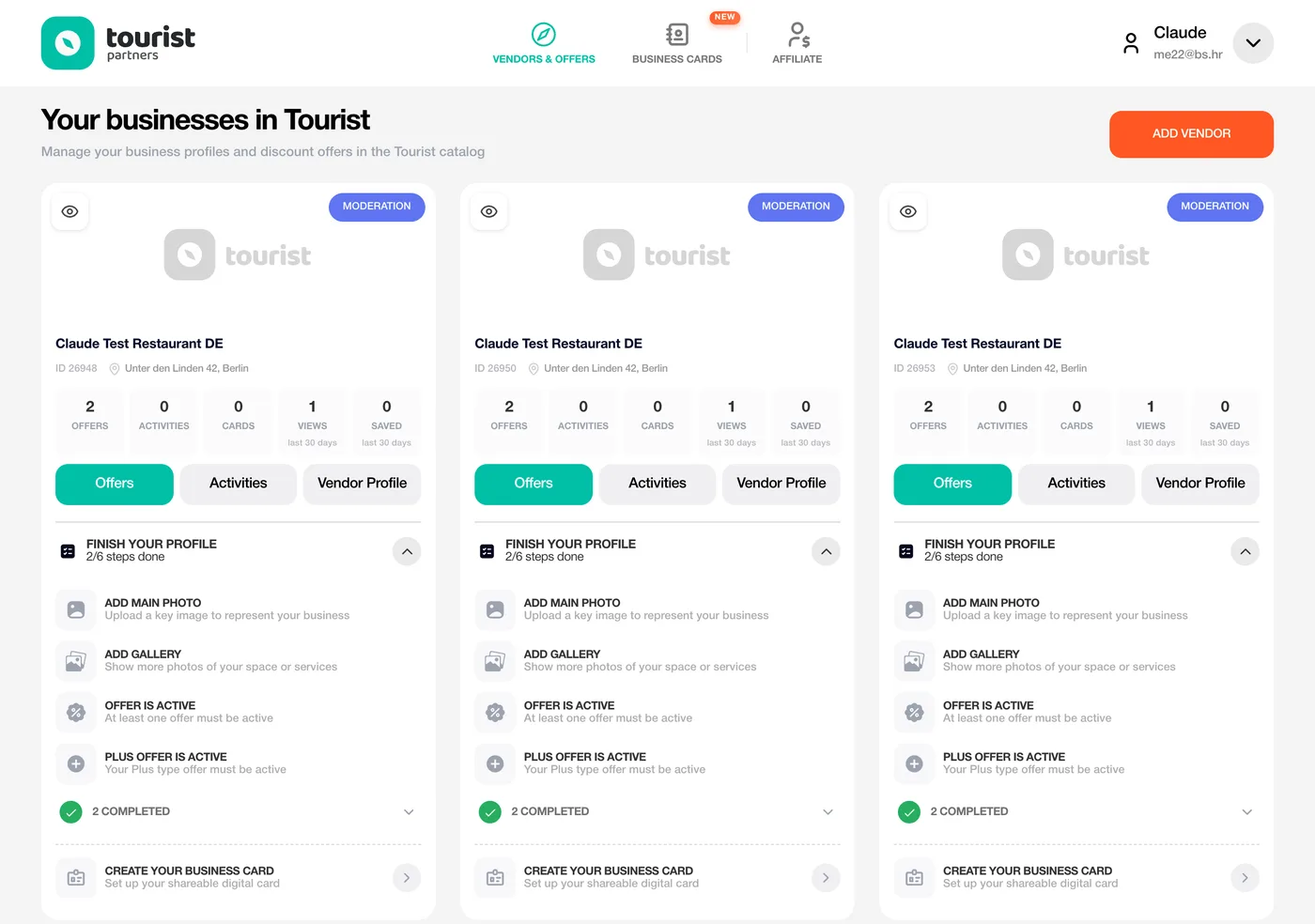
Once you're in you're looking at the partner cabinet. If you have nothing listed yet, the New vendor form just opens by itself. If you already have a place, there's an Add vendor button on the Vendors & offers page. And yes, one account can hold as many businesses as you want, so a bakery with three shops across town is three vendors under one login.
Step 2 — Tell us about the place
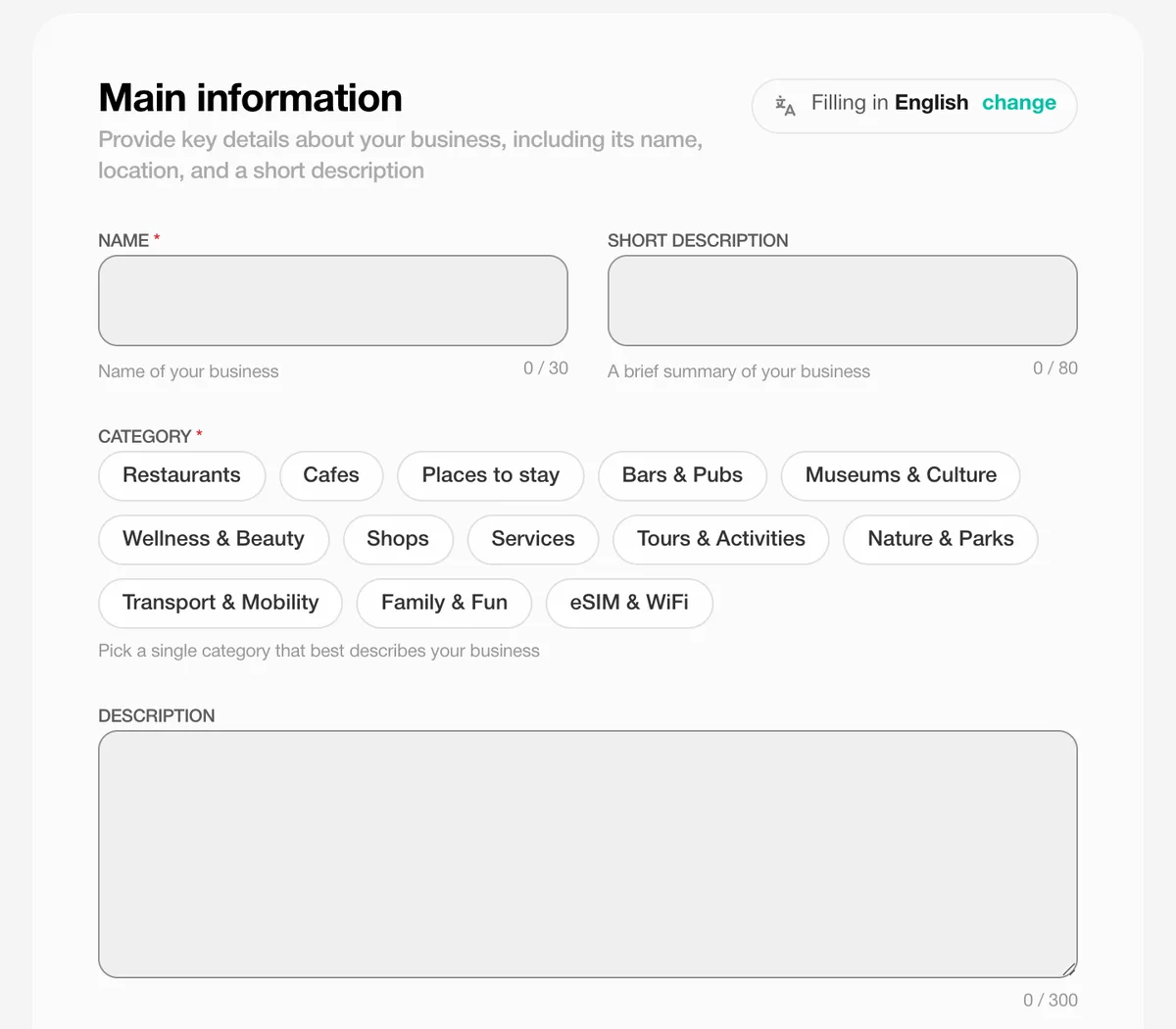
The first block is called Main information. Put the name in the way customers know it, which means without the "Ltd" or the "d.o.o." tacked onto the end. Pick the one category that fits best, then a subcategory, and then there are two bits of text to write, a short line that sits on your card in the catalog and a longer description that lives on the profile page.
The person reading it has never heard of you and will decide in roughly four seconds, so write for them. What is it you do, what are you known for, why should anyone bother walking over? Name the dish. Say where the tour starts and where it ends up. Mention the street, or the neighbourhood, or the fact that you're next to the tram stop. Concrete beats clever, every single time. And please, no ALL CAPS, it reads like someone shouting across the square.
You don't have to write in English. Pick your language at the top of the form and we'll translate the listing for people browsing in English, German, French, Italian, Spanish, Portuguese and a few others.
Step 3 — Put the pin where your door is
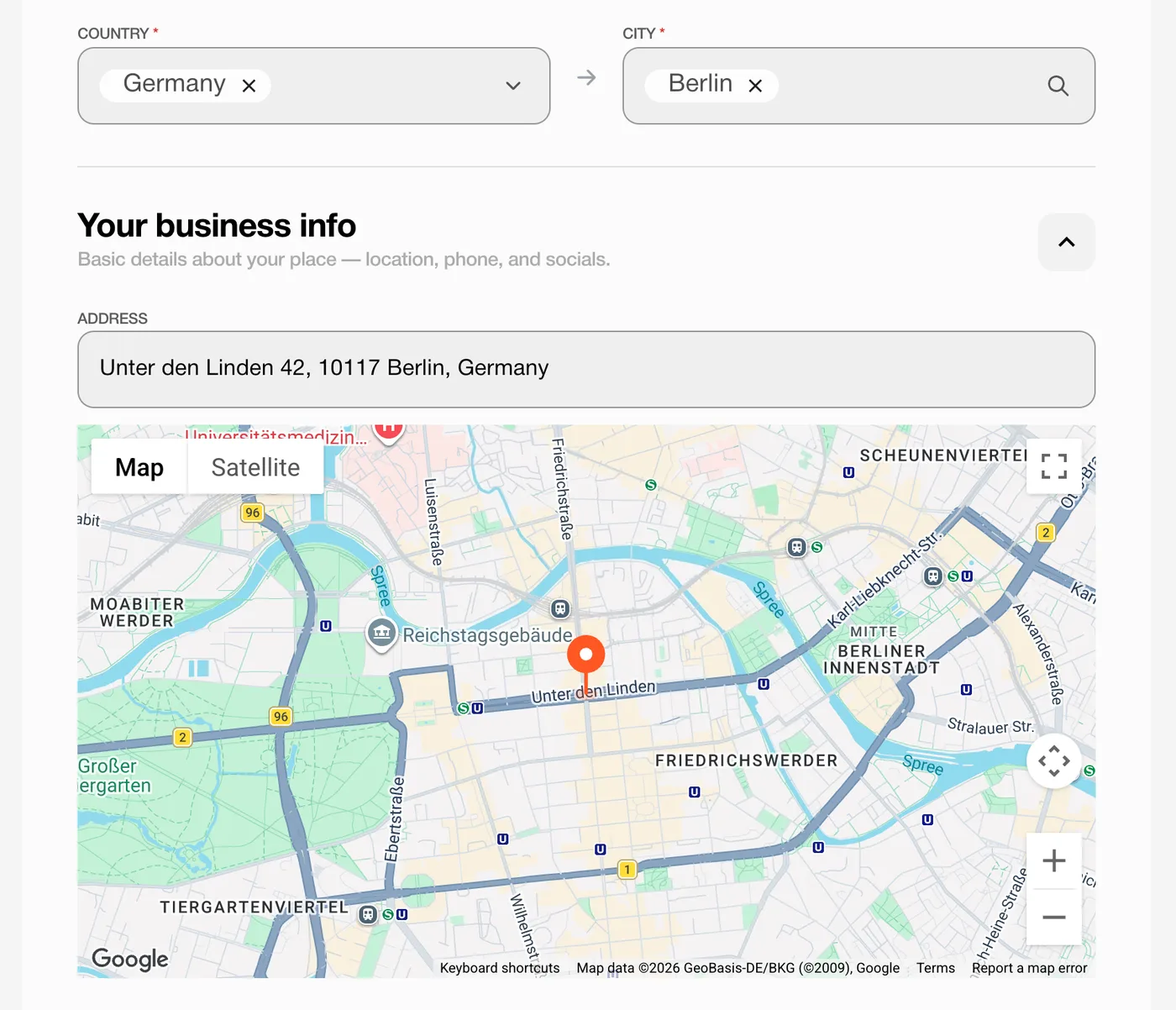
In the Location block, pick the country, then the city from our list. Choose the city where a traveler would actually go looking for you. If you're out in a suburb or a village that isn't in the list, take the nearest city that is; the street address handles the rest.
Now open the section called Your business info and type the full street address, at which point a map pops up with a pin on it. Grab that pin and drag it until it's sitting on your actual entrance, not the building next door, not the middle of the block. Zoom right in. If the streets look like a plate of spaghetti, flip to Satellite view. I keep banging on about this because it matters more than it seems: the app uses the pin, not the words you typed, to place you on the map and to work out how far away someone is. If there's one minute to spend anywhere in this whole form, spend it here.
Doing this on your phone while standing in the shop? Then tap Use my location, allow the location access when it asks, and the pin drops roughly where your feet are; all you do is nudge it and confirm.
No physical address at all, because you sell eSIMs or run something online? Switch on "All cities and countries" instead of picking one city.
Step 4 — Opening hours, phone and the rest
Still in Your business info, fill in the opening hours, a phone number and your website. The hours end up on your public page and, trust me on this, travelers do read them, usually at ten at night while deciding where to go for breakfast. Phone and website are mostly about trust, since people like to poke around a bit before they commit to walking somewhere.
In the Socials block, link the channels you genuinely answer on and skip the ones you don't; a dead Instagram does more harm than none. Instagram, Facebook, WhatsApp, Telegram, Viber, TikTok, they all turn into buttons on your profile. Travelers use them to ask "are you open on Sunday?" and, better, to tag you in their stories, which is advertising you didn't have to lift a finger for.
Hit Create. The business is saved as a draft now, and two more tabs unlock on the left: Gallery and Offers.
Step 5 — Photos
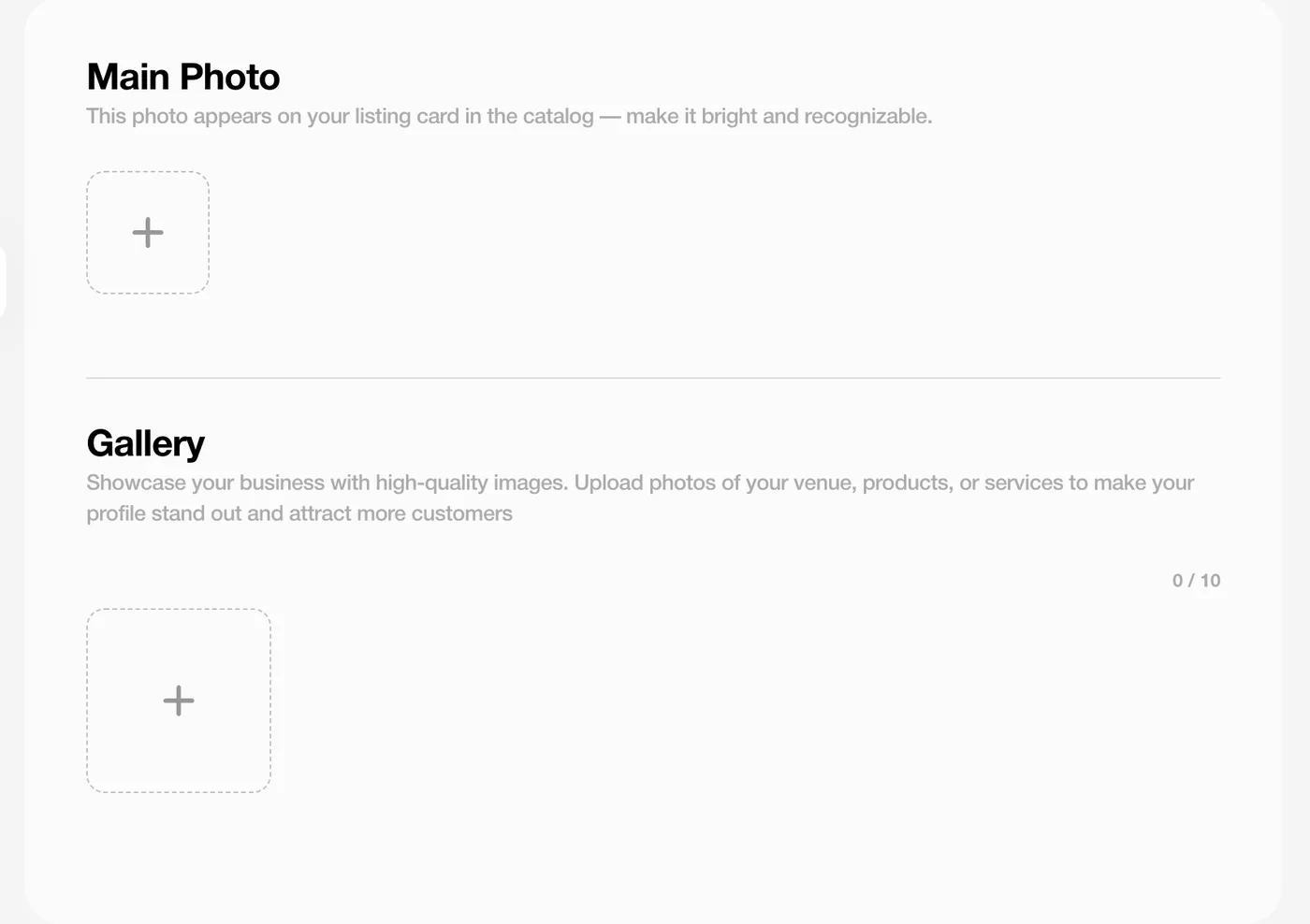
Open the Gallery tab. The Main photo is the one that goes on your card in the catalog and on the map pin, so this is the shot that has to do the selling: the dish everyone orders, the terrace at golden hour, the view from the roof, the boat. Bright, landscape rather than portrait, and no text pasted over it. JPG, PNG, WebP or SVG are all fine, as long as it stays under 2 MB.
Then add up to ten more. I'm not guessing here, we see it in the numbers every week: listings with four to six photos get noticeably more attention than listings with one sad picture. Show the room, the product, the thing that makes you different, so a traveler can picture themselves sitting there.
Step 6 — Your first offer
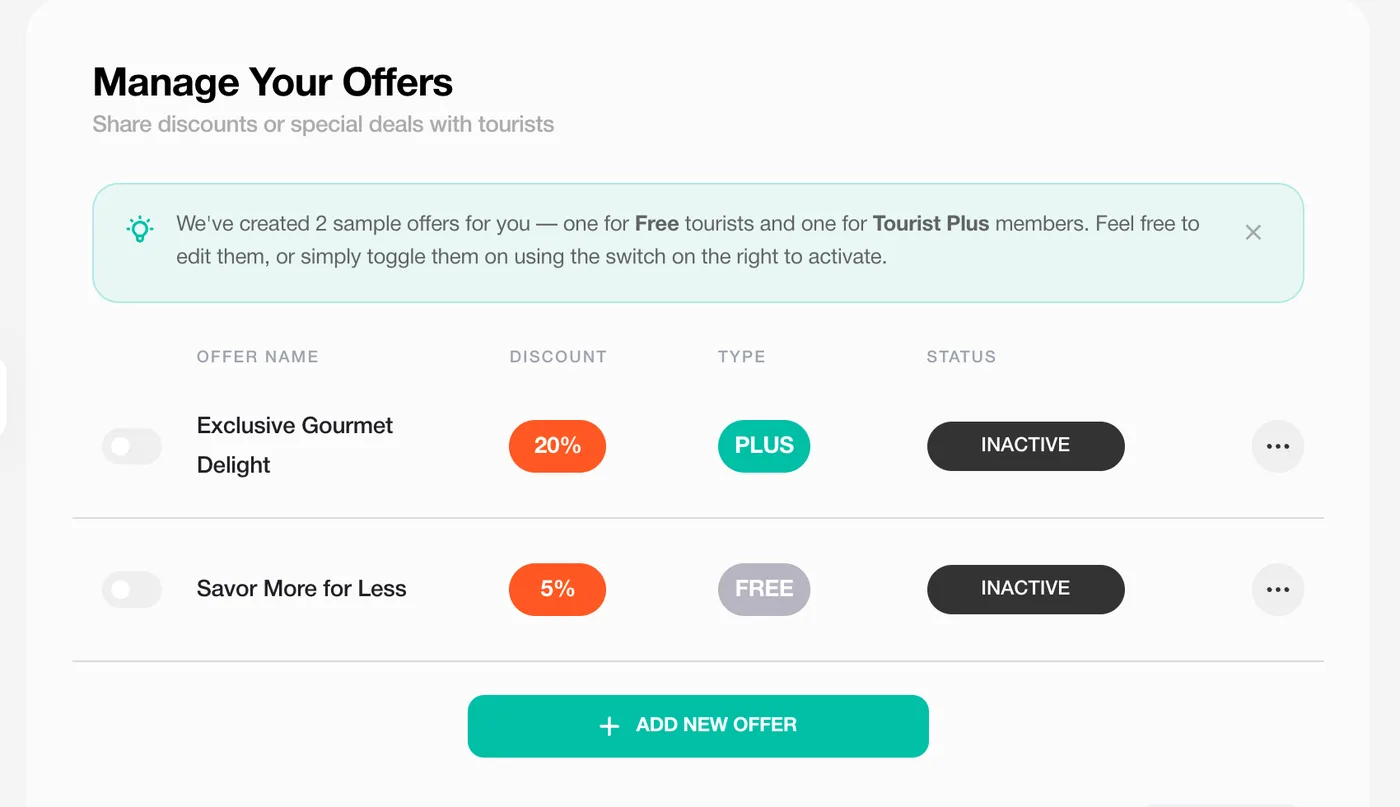
This is the part that turns a nice-looking page into people at your door. A traveler sees the discount on your pin, walks over, shows the card. Open the Offers tab. We've already drafted two sample offers for you: one for anyone with a Tourist Card (we call that Free) and one for Tourist Plus subscribers (Plus). Fix the wording, change the percentage, or ignore them and hit Add new offer.
Keep it dead simple. What works: 10 to 15% off the bill. A free coffee with breakfast. Free dessert with dinner. A welcome drink. 20% off a tour for Plus members. What doesn't work: three lines of small print about weekdays and minimum spend. Set the percentage, give it a one-line name and a short description, flip the toggle on, done.
For what it's worth, Free offers usually land somewhere between 5 and 15%. Plus offers can go all the way to 60%, and they get shown to subscribers who are specifically hunting for the best deal in town. A generous Plus offer is probably the cheapest way to stand out that exists on the platform.
Step 7 — Review, then live
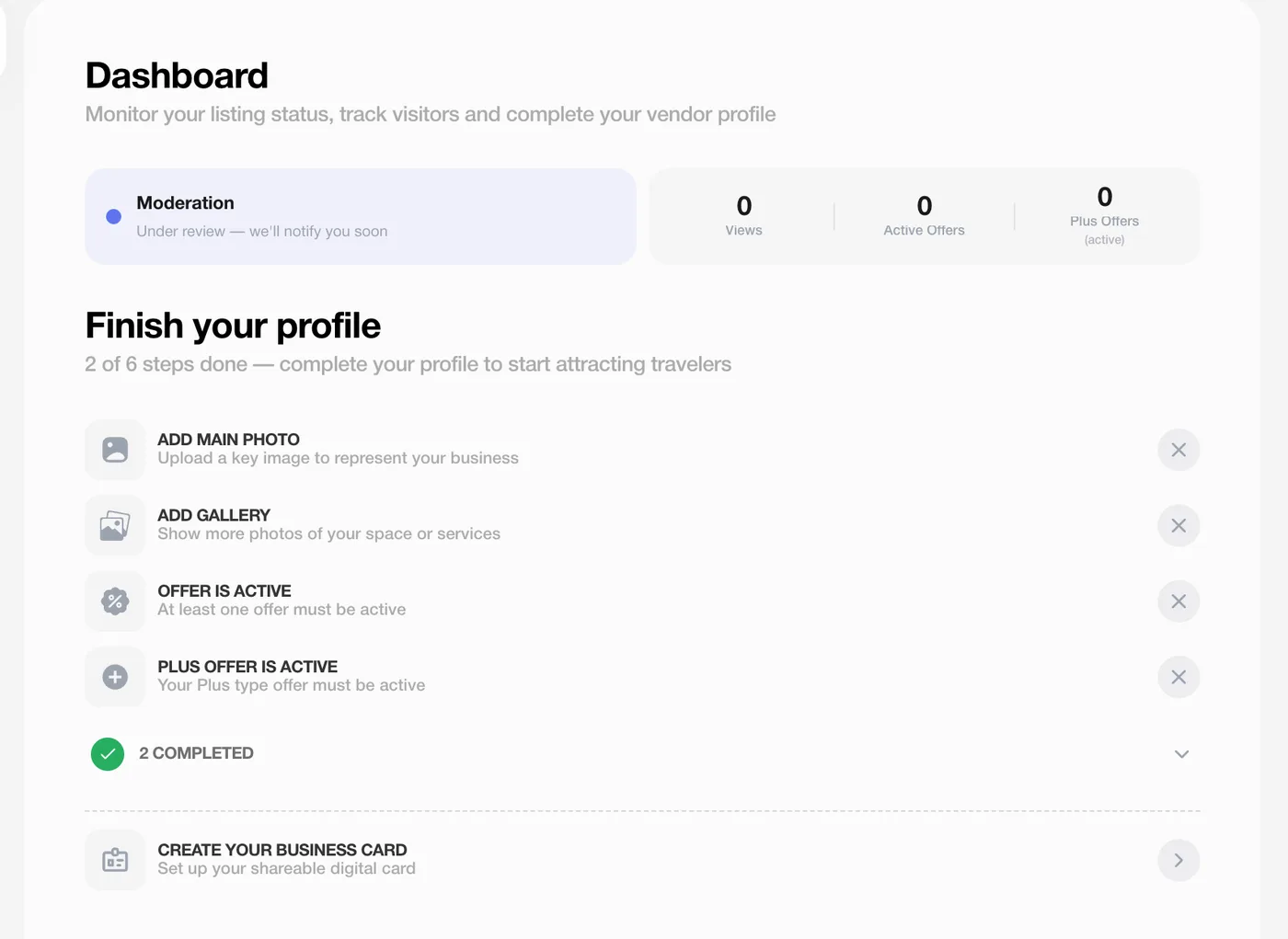
Every new listing gets a quick look from a human on our side before it goes public. You'll see the status on the Dashboard tab and on the vendor card: Moderation while we're looking, then Active. We email you the moment it flips. You don't have to sit and wait, by the way, you can keep editing photos, text and offers the whole time.
The Dashboard also has a little profile checklist: main photo, gallery, one active offer, one active Plus offer. Finish it. Complete profiles rank higher in the catalog and on the map, and honestly nothing else you can do moves the needle as much as ticking those four boxes.
What happens once you're live
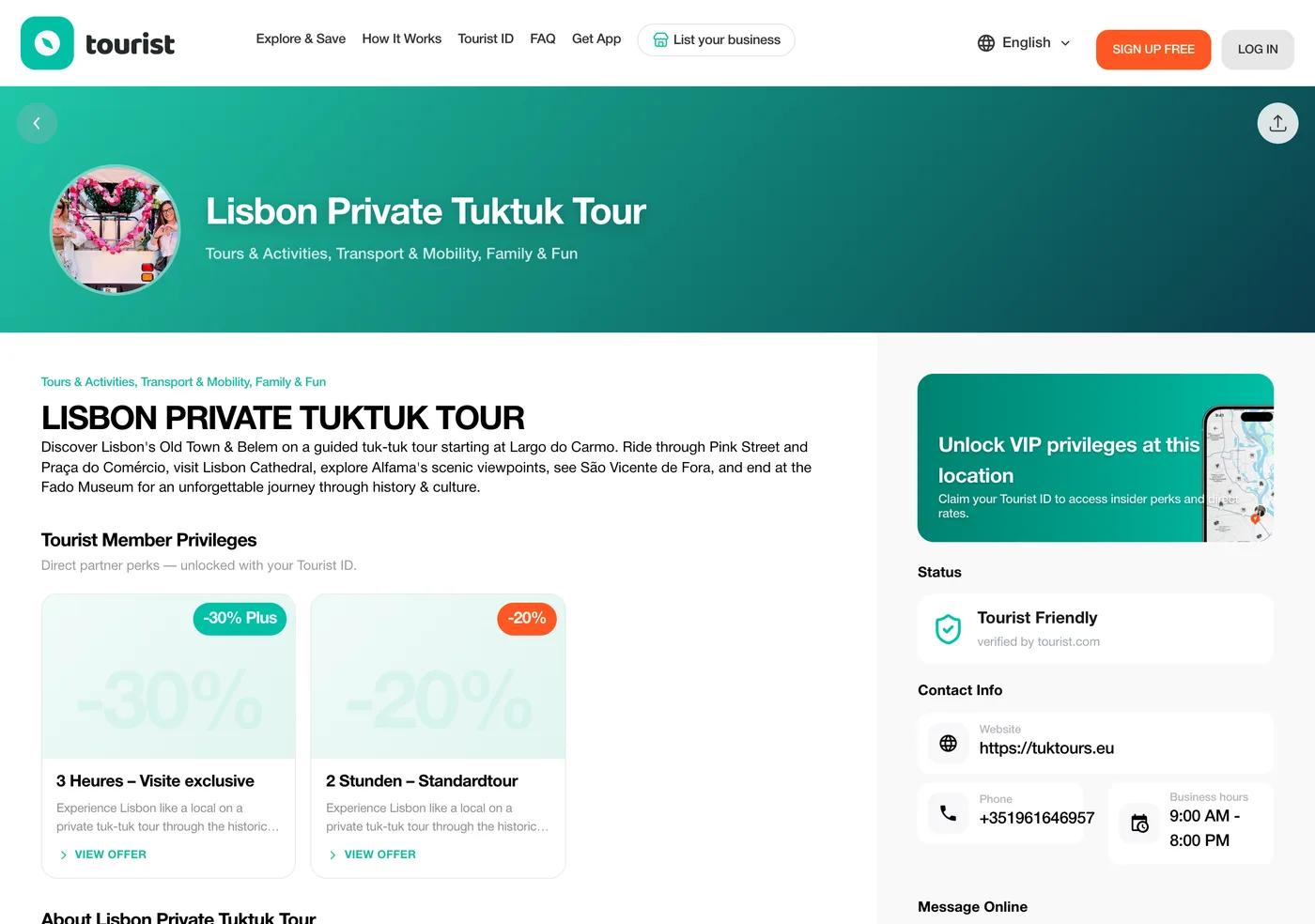
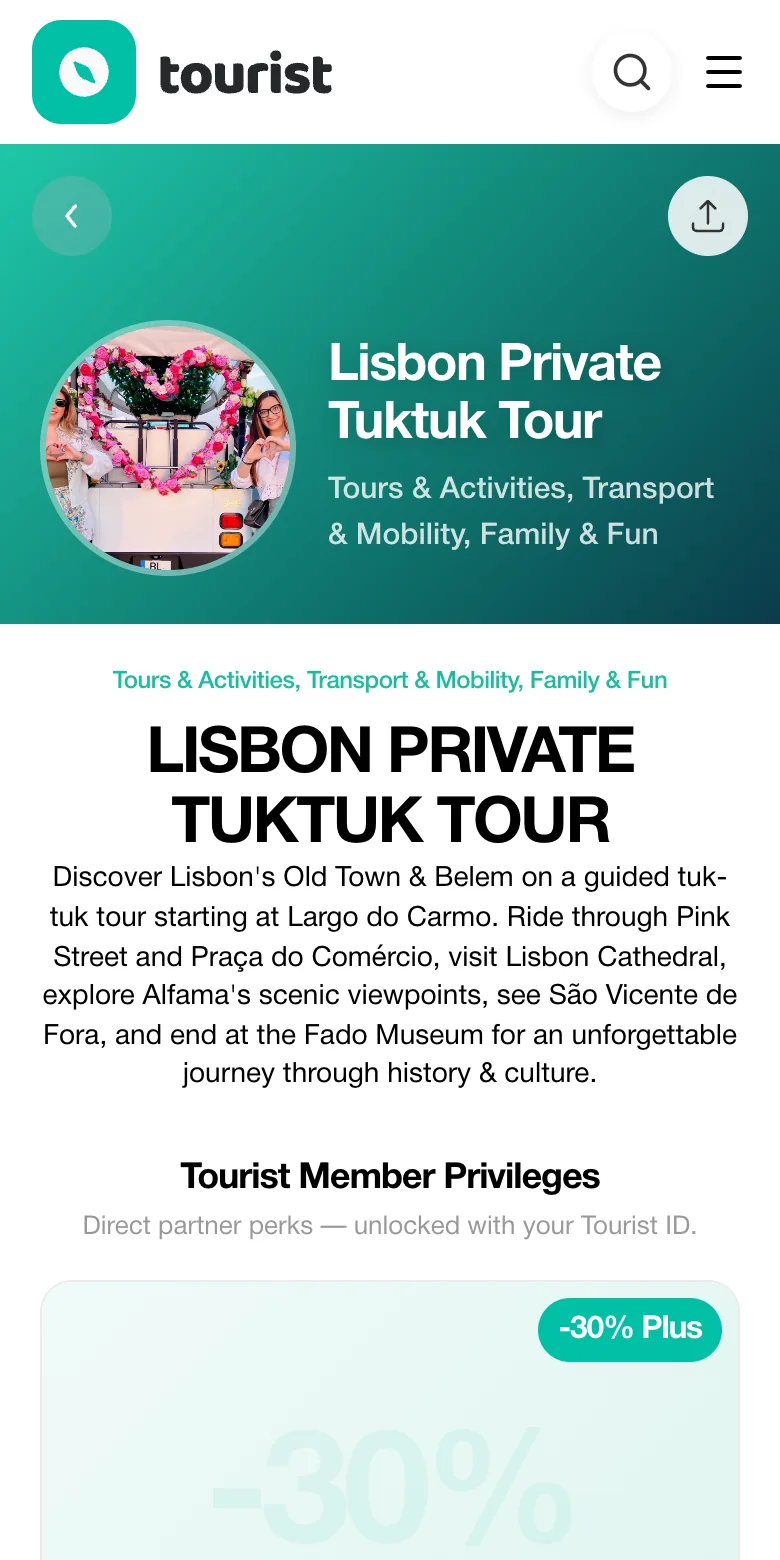
Your place now has a public page on tourist.com: photos, text, offers, the map, your contacts, in several languages. It's in the city catalog, on the Tourist.com map, in search, and in the Tourist app on iOS and Android.
- A traveler spots your offer on the map pin or on your card, comes in, shows the Tourist Card, and you apply the discount yourself at the till. Nothing is booked, nothing is vouchered, nothing is commissioned.
- The Analytics tab shows how many people looked at you, how many saved you for later, and where they came from.
- Under Business cards you can make a digital card with a QR code, then print it as a sticker for the door or a little card for the tables, so walk-ins can open your offers on the spot.
- Swap a photo or tweak an offer every now and then. Listings that get touched get shown more.
Already on Tourist.com without knowing it? Claim the page
We list more than 55,242 businesses, and a good chunk of them were added from public sources long before the owner ever heard of us. If you search tourist.com and find your own place sitting there, unmanaged, open the page and hit Claim this business. We send you a code, you confirm you're the owner, and the listing moves into your partner cabinet where you can edit everything I've described above.
Claiming is free, it keeps whatever views and saves the page has already collected, and it's quicker than building a duplicate from scratch (which also confuses travelers, so please don't).
Questions I get asked a lot
Is it really free to list a business on Tourist.com?
Yes, really. The account, the listing, the photos, the offers, all of it. We don't take a commission on anything you sell and there is no paid tier for businesses hiding somewhere.
How long until my listing shows up?
The form takes about ten minutes. Then someone on our team looks it over. You'll get an email the moment it's live, and you can keep editing while you wait.
Do I need a website, or an Instagram account, to get listed?
No. A name, a category, a city and an accurate pin will get you published. Website and socials are optional, although they do make people trust you a little more.
I have three locations. Three listings?
Yes, three vendors under one partner account, each with its own address and its own pin, so each one lands on the right street on the map.
What kind of offer do I have to give?
That's entirely yours to decide. Most partners start with 10 to 15% off, or a free item, for anyone with a Tourist Card, and something a bit stronger for Tourist Plus members. Change it or pause it whenever you like.
How does a traveler actually use the discount?
They show the digital Tourist Card in the app or on the website, or they scan your QR business card. You apply the discount at the till. Nothing goes through Tourist.com and there's no voucher for you to validate.
Can I write my listing in my own language?
Yes. Pick the form language at the top of the vendor page and write away. We translate it for travelers browsing in other languages.
My business is already on tourist.com. Now what?
Open your page there, click Claim this business, confirm with the code we send you. The listing moves into your partner cabinet and it's yours to edit.
That's it. Ready?
Ten minutes, zero cost, and your place is in front of travelers who are already walking around your city looking for somewhere to go.